I was deep in a Hyvä v3 theme rebuild, running Tailwind v4. One bug kept coming back wearing a different mask each time. I'd write a utility class, reload, and nothing happened. The element ignored me. My first instinct was always the same: "something more specific is overriding it."
It almost never was.
Over the foundation work and then the homepage, I root-caused this "my class does nothing" symptom three separate times. Three different mechanisms. Two of them look exactly like a specificity fight but are not. Here's how to tell them apart in seconds instead of squinting at the cascade in DevTools for twenty minutes.
1. The rule was never generated
This is the Tailwind v4 trap that catches everyone coming from v3.
In v4 you can switch off automatic content detection with source(none), then register what Tailwind should scan using @source. Hyvä leans on this so the compiled CSS stays lean.
The trap: use a utility in a template that no @source path covers, and Tailwind never sees the class. It never generates the rule. So class="mt-8" sits in your markup pointing at CSS that does not exist.
Open DevTools. The element has the class. There is no margin-top declaration anywhere, not struck through, just absent. That absence is the tell. A specificity loss shows a crossed-out declaration. A missing rule shows nothing at all.
Fix: add the directory to @source and recompile. Most of the time the path glob was simply too narrow.
@import "tailwindcss" source(none);

@source "../../**/*.phtml";
@source "../../**/*.html";
2. Cascade layers beat specificity
This is the sneaky one.
Tailwind v4 emits its utilities inside native CSS cascade layers. Layers carry a rule most of us never had to learn before: any unlayered CSS beats any layered CSS, whatever the specificity.
So a stray rule with no layer (a third-party module's stylesheet, a hand-written block you forgot to wrap) will beat your Tailwind utility. Your selector can be more specific and still lose. That is what makes it read as a specificity bug. You inspect both rules, yours looks like it should win, and it doesn't.
The tell is in DevTools: the winning rule sits in the no-layer group, your utility sits under a named layer below it. Once you know to read the layer column, it is obvious. Until you do, it is maddening.
Fix: move the offending CSS into a layer, or stop loading unlayered third-party CSS after Tailwind.
3. It actually is specificity
Sometimes the boring answer is correct.
A base-theme selector genuinely is more specific than your single utility. Or, the v4 twist, two utilities of equal specificity resolve by their order in the compiled stylesheet, not the order you wrote them in class="". Writing class="p-2 p-4" does not guarantee p-4 wins. The winner depends on where those rules land in the generated CSS.
This is the only one of the three where the old model still holds: compare specificity, later source wins ties. Which is exactly why it pays to rule out the other two first.
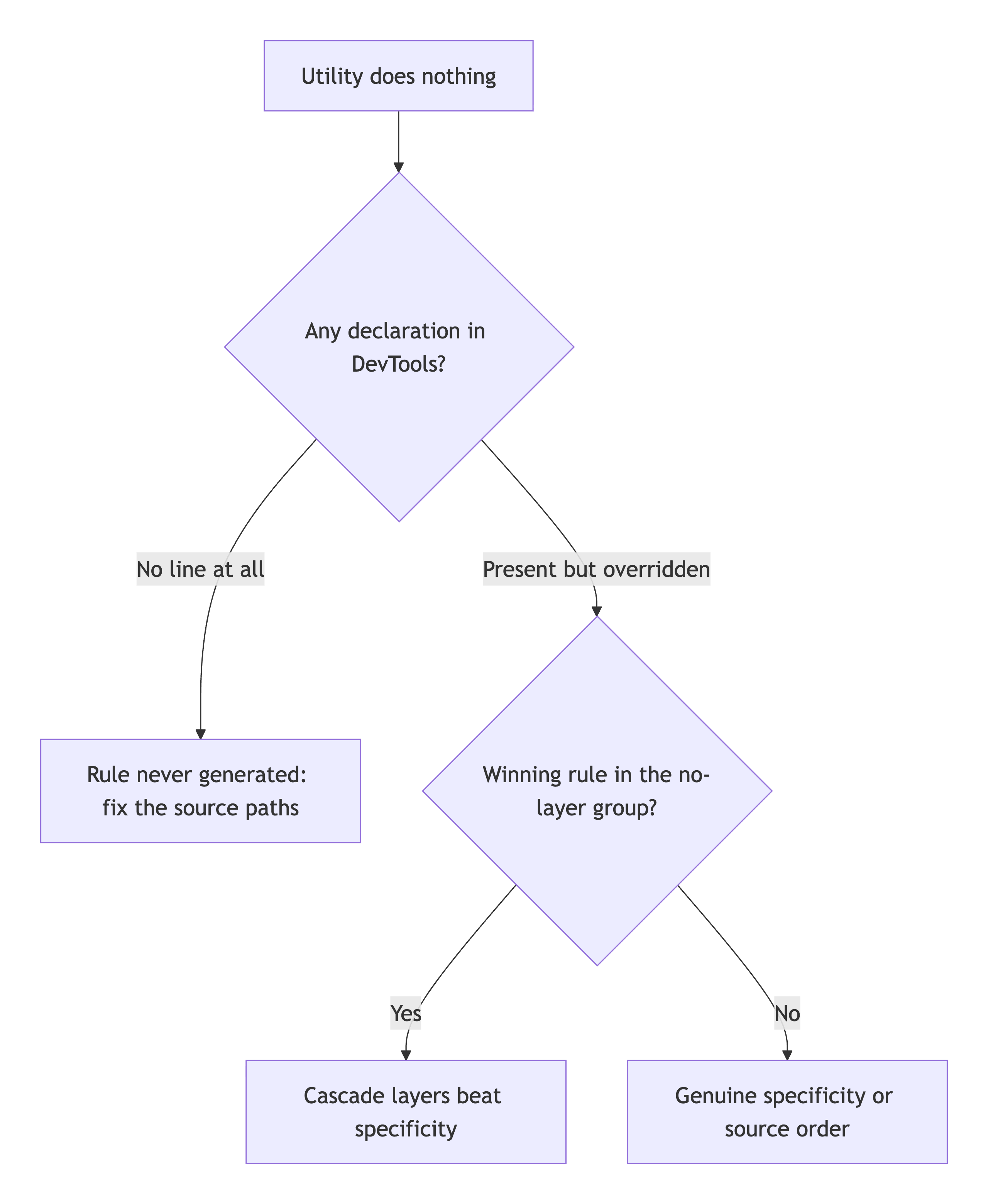
The triage
When a utility does nothing, before you touch specificity:
- No declaration at all in DevTools? It is #1. The rule was not generated. Fix
@source. - Declaration present but the winner sits in the no-layer group? It is #2. Cascade layers. Move the loser into a layer.
- Declaration present, winner more specific or later in source? It is #3. Real specificity. Now you can fight it honestly.
Two of the three were never a specificity problem. Knowing that turns a twenty-minute DevTools dig into a ten-second glance at the right column.